
Last updated on June 14, 2023
Cloud Migration Strategy Guide [and Checklist]
By Josh Johnston
Whether you are considering moving your data to the cloud, are in the process of choosing a cloud platform, or are optimizing existing cloud resources — you need the right strategy in place so you can reap all the benefits the cloud can offer.
This blog will guide you through the process of moving your data assets to a cloud environment, including how to create a cloud migration plan and the elements of a cloud migration strategy. It also covers key factors to consider so that you can optimize existing cloud environments to reduce costs, increase performance, and address technical debt.
One of the biggest benefits of the cloud is that the barrier to entry is low because it’s very easy to spin up a server and start playing around. We recommend that you balance the ease with proper planning and a cloud migration strategy so that you can:
→ Download: Cloud Readiness Assessment Checklist
In this blog, we cover:
- What is a Cloud Migration?↵
- What is a Cloud Readiness Assessment and How Do I Start?↵
- How to Create a Cloud Migration Plan ↵
- How to Execute on Your Cloud Migration Plan ↵
- How to Operate and Optimize Your Cloud Environment ↵
What is a Cloud Migration?
A cloud migration is the process of moving an organization’s digital assets, IT resources, services, databases, and applications from an on-premises legacy infrastructure to a public cloud hyperscaler such as AWS, GCP, or Azure environment, or to a cloud-native data platform like Databricks that runs within those environments. It involves more than just moving your data; it’s moving your data and analytics workloads as well.
A cloud migration has several benefits for an organization, including cost savings, scalability, flexibility, reliability, improved collaboration, and reduced IT overhead, to name a few. But there isn’t a one-size-fits-all approach, and you need to make sure that you’re ready for the cloud before making the move.
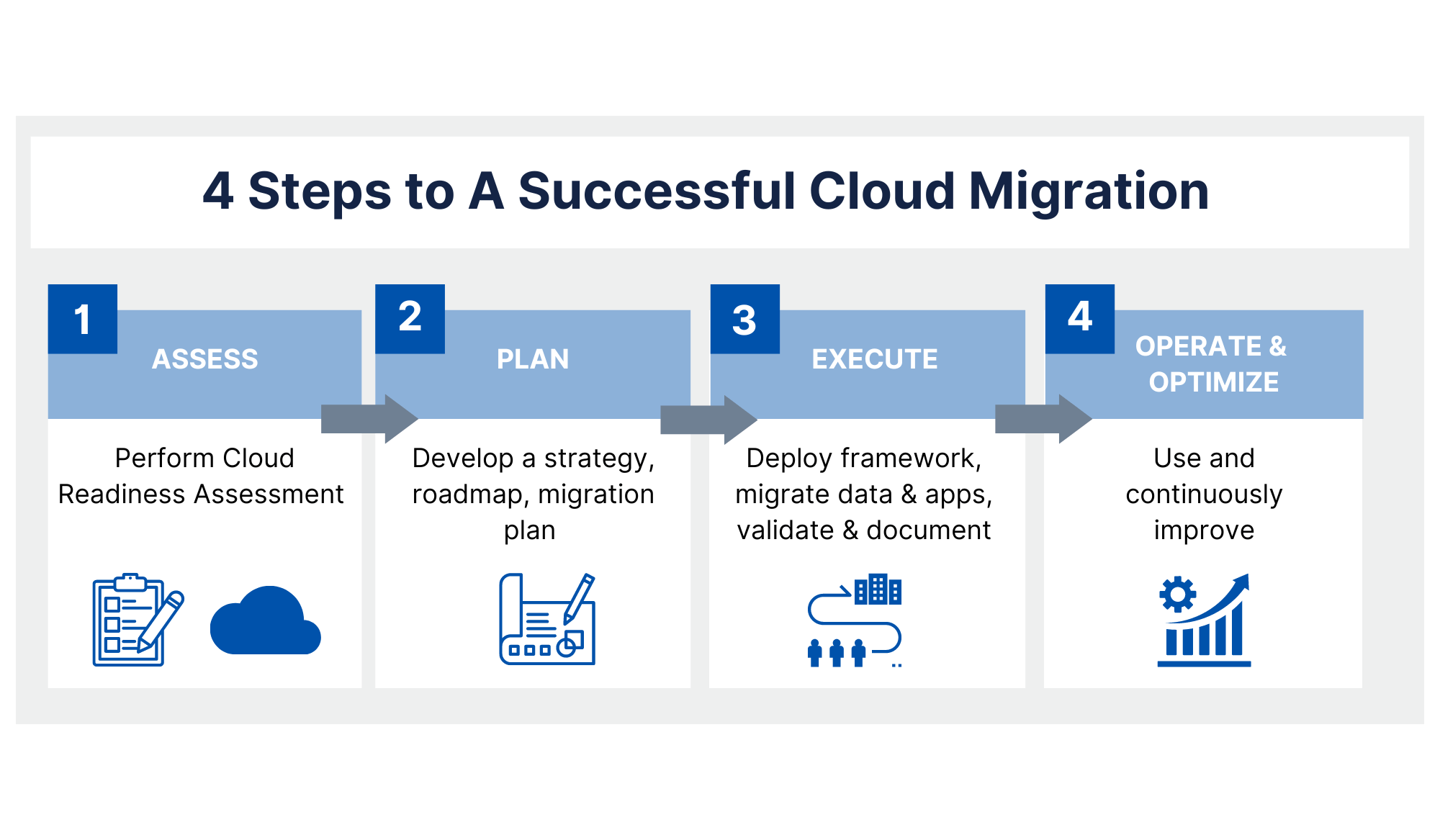
There are four critical steps to ensure a successful cloud migration, including a cloud readiness assessment, a cloud migration plan, a framework to execute your plan, and a strategy to operate and optimize your cloud environment.
What is a Cloud Readiness Assessment and How Do I Start?
As with most analytics projects of any magnitude, you should start with a readiness assessment to determine if you’ve accounted for everything. Before making the move to the cloud, review your current environment — corporate and remote workforces, business needs, and priorities, your data, regulatory and security concerns, existing on-premises and cloud infrastructure, applications, and dependencies.
With a firm understanding of your operations and existing assets, you’ll have a better idea of the best path forward for your cloud migration strategy.
The steps of a cloud readiness assessment should include:
How to Create a Cloud Migration Plan
When it’s clear where you’re coming from, where you’re going, and who’s going to support you along the way, the next step is to develop a detailed plan. The cloud migration strategy should contain the following elements:
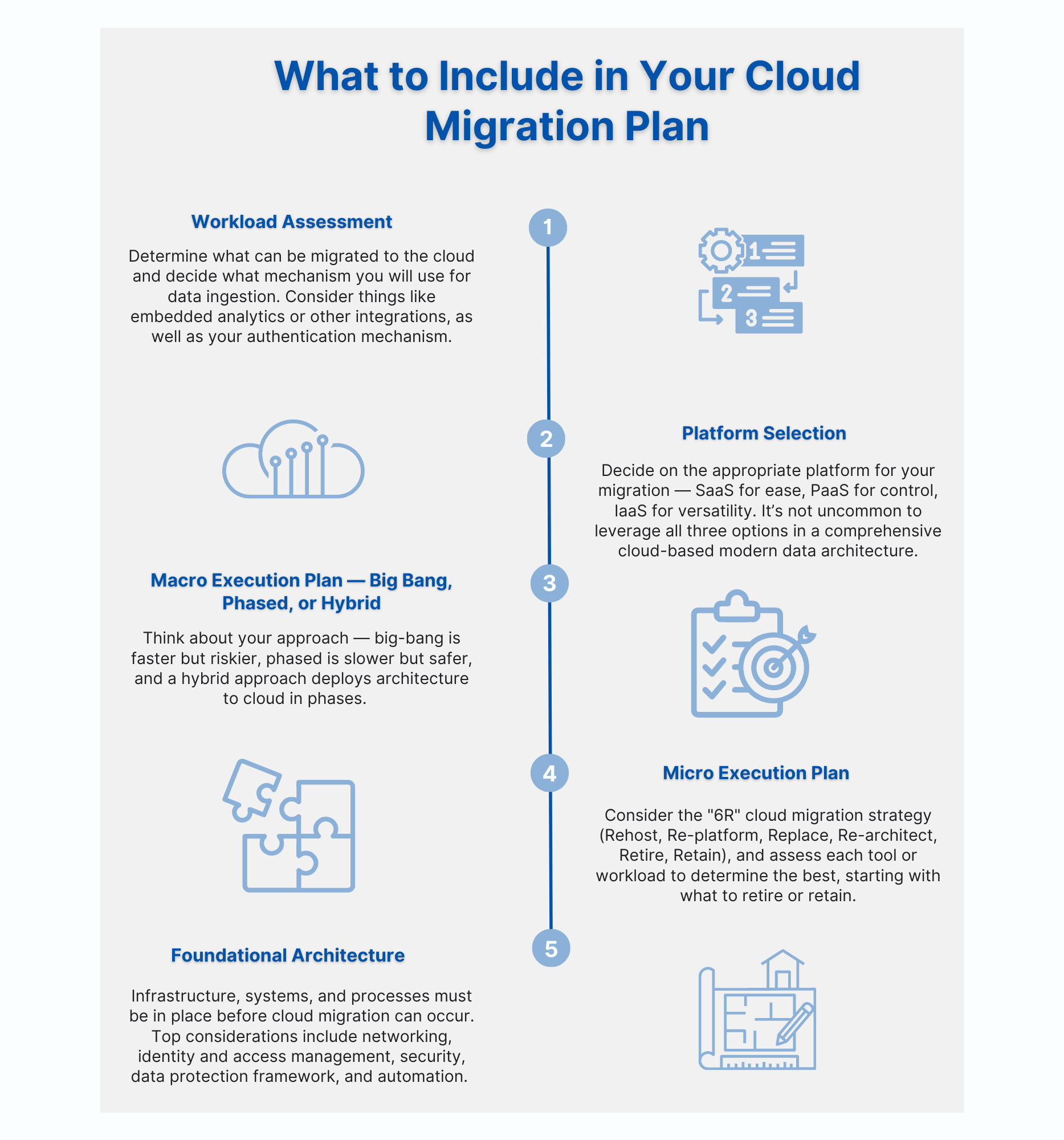
- Macro Execution Plan — Big Bang, Phased, or Hybrid: With a big-bang approach, the project can be completed faster, but also with greater risk. A phased approach usually takes more time, but the cloud migration team can focus on smaller chunks of the workload during each phase. If going this route, consider breaking it out by business unit or end-user application, and break up the complexity into separate phases to reduce risk in each phase. The hybrid approach often entails deploying the architecture to the cloud, but migrating content in phases, often aligned with business units or lines of business. Like a phased approach, you’ll probably run your legacy stack and cloud deployment in parallel until you can comfortably cutover.
- Micro Execution Plan: This is where you consider the individual needs of each tool or workload to determine the best micro-execution plan. A common industry term for these micro-execution approaches is the “6R”. First, consider what is to be retired or retained as it currently exists. This enables you to immediately trim down your area of focus. Then you can shift focus to the other four Rs—rehost, re-platform, replace, and rearchitect. Here is a breakdown of the “6R” cloud migration strategies:
- Rehost: This is also commonly referred to as a “lift-and-shift” of the applications and is the most common strategy as it is the simplest and fastest approach. It does, however, limit cloud-native opportunities. This strategy is best for a large-scale legacy migration scenario where the organization is looking to move quickly to meet business objectives because it requires the least change to workloads and processes. Re-hosting can be automated with tools made available by cloud providers.
- Re-platform: This means that the underlying architecture stays the same between cloud and on-prem, but the systems that run on the infrastructure — such as databases or operating systems — change. The re-platform strategy only requires a few modifications to achieve some noticeable benefits, as you are simply looking to optimize the applications you currently have.
- Replace: This involves moving to a different product with a new architecture or the same product with a new service delivery model, like Infrastructure as a Service (IaaS) to Software as a Service (SaaS). This is common for organizations that are looking to move away from managing installed applications or those that just want to replace an application with a different product from a different vendor. The replacement strategy can be implemented if you are already on the cloud and want to move significant workloads.
- Re-architect: This is often the most expensive and requires reimagining how the application is developed. It is effectively a modernization that involves redesigning the application and infrastructure architecture using cloud-native and often (but not always) open-source tools, technologies, and frameworks like serverless, Kubernetes, and containerization, cloud-native or serverless databases, streaming data ingestion, and spot server instances. Organizations that use this strategy usually do so to add features and scale or to improve existing applications within their current environments.
- Retire: This is helpful to identify what applications you don’t need anymore. Some applications are no longer useful to your organization, and if you can identify these before you move to the cloud, you can shift your focus to the applications that are being used and are necessary to meet business objectives. The retirement strategy also results in cost- and time-saving.
- Retain: This helps you identify which applications you’re not ready to move to the cloud, but that you may need to revisit after you’ve completed your cloud migration. In this instance, you would retain certain aspects of your IT services in the current environment until you are ready to move them over to the cloud.
- Foundational Architecture: This is where you consider the underlying infrastructure, systems, and processes that must be in place before a cloud migration can occur, serving as the backbone to support the deployment, operation, and maintenance of cloud-based services. Here’s a list of top considerations:
- Networking: Start with networking requirements so that you establish a resilient and performant foundation upon which your cloud solution can be built. If you’re all-in on the cloud, you may not need anything beyond a direct VPN to manage the platform. If you host in your facility and data volumes are reasonable, a site-to-site VPN may be adequate. When dealing with large data volumes coming from on-prem systems, AWS Direct Connect or Azure Express Route enables low-latency connectivity directly into the cloud provider’s backbone.
- Identity & Access Management: If your application requires domain membership, you can connect to your on-prem domain controller or deploy a new one to the cloud environment. If using Windows authentication for your application, domain connectivity might be required; however, SAML authentication could be an option to avoid a domain controller dependency.
- Security: This has long been a concern with cloud environments, but the native tooling and push-button options at your disposal give you incredible power and flexibility to secure your environment. Defined user roles and responsibilities, and a proper change management framework should be implemented to avoid the human error responsible for most system breaches. A best practice is to deploy encryption in transit and at rest across your cloud landing zone; it’s simple to deploy and maintain in modern cloud environments.
- Data Protection Framework: Data protection is an extension of security. Snapshots and backups can be scheduled and retained or rotated as needed (but remember to monitor the costs associated with storage). Disaster recovery and resiliency are robust and attractive features in modern cloud platforms. Rather than manage dedicated disaster recovery sites or co-location facilities, there are other scenarios like hot/cold, pilot light, or complete load-balanced redundancy across geographic regions to ensure business continuity. Consider the revenue impact of a system going down before you define your disaster recovery strategy.
- Automation: Consider investing in Infrastructure as Code (IaC) from the outset. Native tooling or third-party offerings allow you to define your infrastructure in templated and parameterized configuration files so you can quickly redeploy your stack.
How to Execute on Your Cloud Migration Plan
When executing your cloud migration plan, it is important to take a well-planned and systematic approach to avoid any potential pitfalls or disruptions to your business operations. Here are 6 clear steps to take to successfully execute your cloud migration plan.
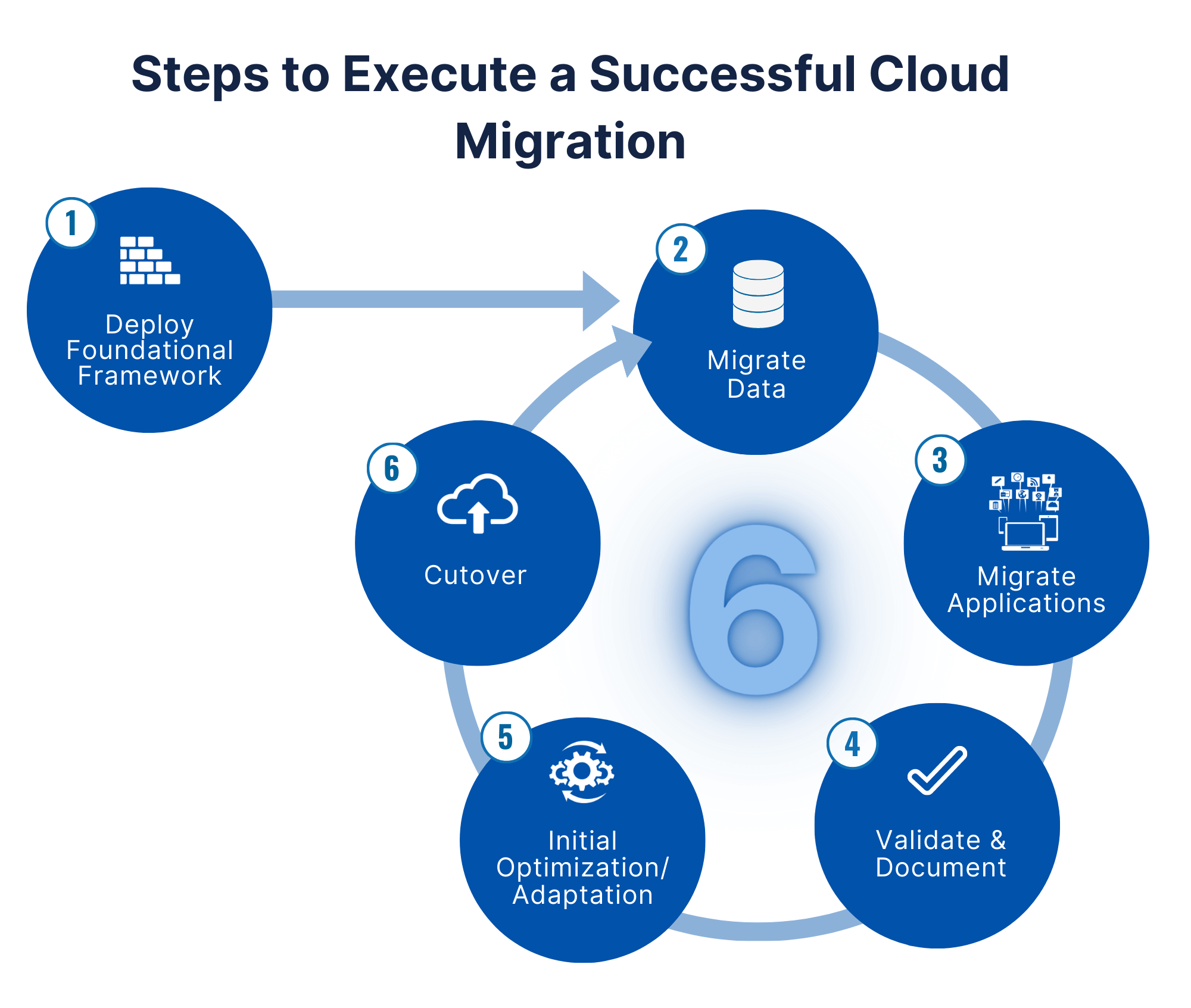
- Start by deploying the foundational framework: This includes the actual cloud provider and setting up identity access management, networking, security, tagging and cost management, and automation.
- Migrate data: Start with one database, take a phased approach, or do it all at once.
- Migrate applications: Establish connectivity, make sure everything is configured properly, ensure scheduled jobs are running, etc.
- Validate and document: Ensure accuracy and reliability.
- Initial optimization/adaptation: There will always be some minor things to adjust to adapt to the cloud; do initial optimizations.
- Cutover: This will happen many times if you are taking a phased approach.
How to Operate and Optimize Your Cloud Environment
Once in production, keep optimizing your environment. The following are not one-time tasks; they should be performed continuously.
While the above steps are a great guide for your move to the cloud, remember that no migration will look the same. Your cloud migration process and overall strategy should be based on a long-term direction that delivers real business value. Take the time to think about how the cloud can be utilized to promote success at your organization.