
Last updated on August 14, 2026
BigQuery, dbt, and Looker: An Analytics Stack for Google Cloud
By Tracey Doyle
Organizations evaluating modern analytics architectures often consider BigQuery, dbt, and Looker because each addresses a different layer of the analytics stack. BigQuery provides a scalable cloud data warehouse, dbt manages data transformation, and Looker delivers governed analytics and business intelligence.
Like any technology decision, whether this combination is the right fit depends on an organization’s existing cloud platform, data strategy, governance requirements, and long-term analytics goals.
In this guide, we’ll look at what each tool does, where they complement one another, and when this combination makes sense as part of a modern analytics architecture.
Table of contents
How BigQuery, dbt, and Looker Work Together
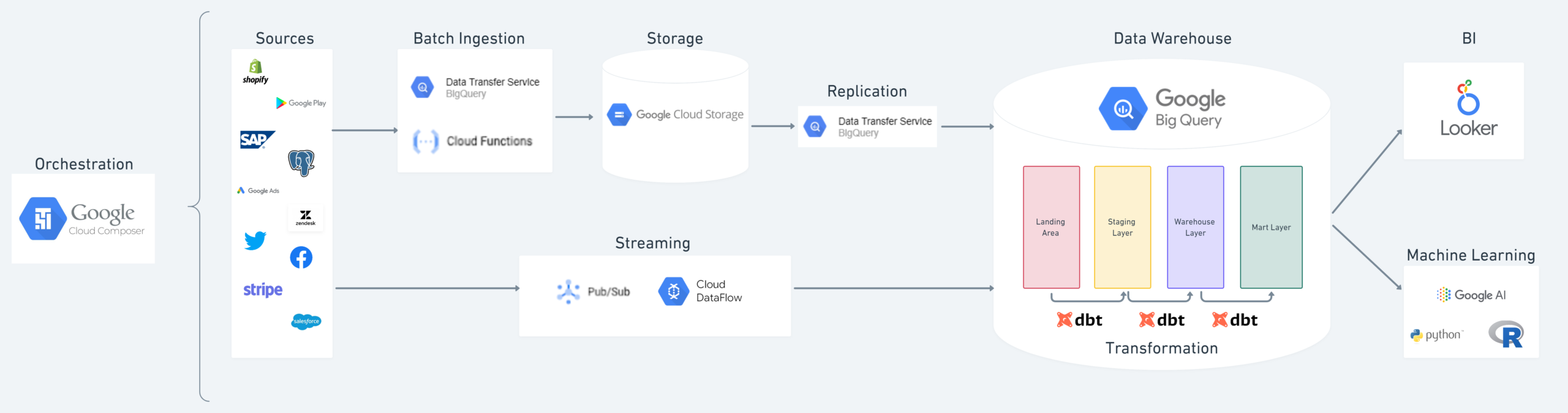
Each platform serves a distinct role within the analytics stack. Together, they create a modern analytics workflow that moves from data storage and transformation through governed analytics and business decision-making.
BigQuery + dbt
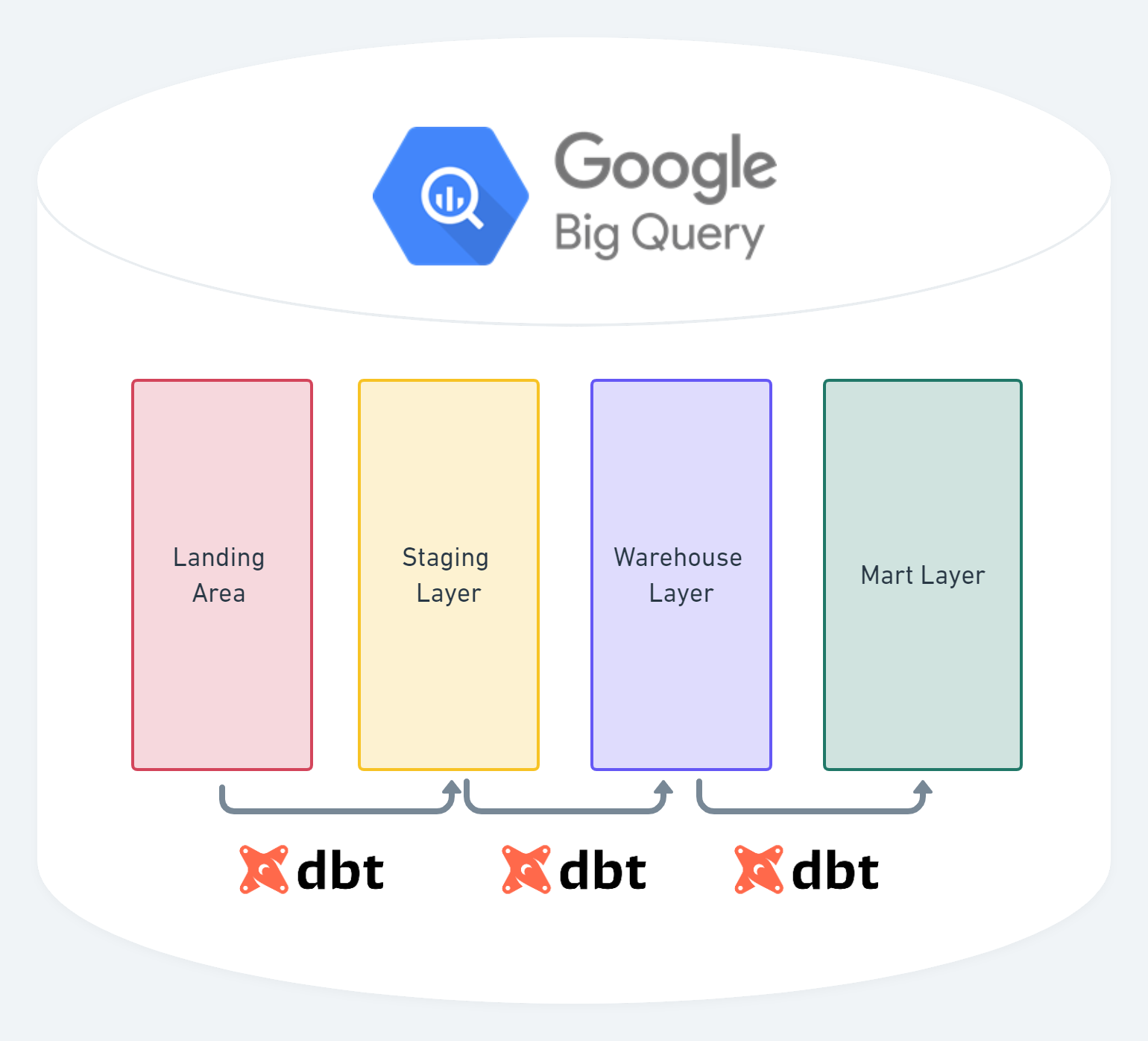
As data environments grow, managing transformations directly in the data warehouse becomes difficult. dbt provides a structured framework for developing, testing, documenting, and deploying those transformations.
BigQuery + Looker
Looker queries BigQuery directly, allowing organizations to analyze governed data without extracting or duplicating it elsewhere.
Looker + dbt
dbt transforms raw data into trusted analytics-ready models. Looker builds on those models to deliver governed metrics, dashboards, and self-service analytics to business users.
Example of a modern analytics implementation with BigQuery, dbt, and Looker
BigQuery’s Role in a Modern Analytics Stack
BigQuery is Google’s fully managed cloud data warehouse. Organizations often choose it for its serverless architecture, elastic scalability, and native integration with the broader Google Cloud ecosystem. Three characteristics commonly influence why teams select BigQuery as the foundation for their analytics platform.
Serverless Infrastructure
BigQuery is a fully managed, serverless data warehouse, so organizations do not need to provision or manage infrastructure. There is no need to configure computational scalability; Google manages all resources for you and bills you on how many bytes are scanned during queries. You have access to unlimited resources with petabyte scalability— Its architecture is designed to support workloads ranging from small analytical queries to petabyte-scale datasets.
Consumption-Based Pricing
BigQuery separates storage and compute, allowing organizations to pay for the resources they use rather than maintaining dedicated infrastructure. Features such as long-term storage pricing for infrequently modified data and query result caching can help reduce operating costs, depending on workload and usage patterns. Organizations can also use pricing controls and monitoring tools to better manage query costs.
Machine Learning Capabilities
BigQuery includes native machine learning capabilities through BigQuery ML, allowing data teams to build and execute machine learning models using standard SQL queries directly in BigQuery. It supports a range of model types and integrates with AI and machine learning services across the broader data ecosystem. Many organizations also operate BigQuery alongside platforms such as Databricks, allowing different technologies to support distinct workloads while sharing governed data.
dbt’s Role in the Modern Analytics Stack
dbt is a data transformation framework tthat enables data teams to transform, test, document, and manage analytics code using SQL. It helps data teams apply software engineering practices to analytics development, making transformation logic easier to develop, govern, and maintain as data environments grow.
Because dbt supports multiple cloud data platforms—including BigQuery, Databricks, Snowflake, Microsoft Fabric, and others—it provides a consistent development framework across a variety of modern analytics architectures.
SQL-Based Data Transformation
dbt enables analytics engineers to build modular SQL models that transform raw data into trusted, analytics-ready datasets. By organizing transformations into reusable models, organizations can improve consistency, simplify maintenance, and reduce duplicated logic across reporting and analytics initiatives.
Version Control and Collaborative Development
dbt Cloud provides an integration with version control tools like GitHub, GitLab, and Azure DevOps to ensure that your development process remains stable while teams work in tandem.
Documentation and Data Lineage
dbt automatically collects lineage on your projects and allows many customizations for defining business logic. All this information is compiled into one spot which helps teams understand how data flows through the transformation pipeline, identify upstream and downstream dependencies, and make changes with greater confidence.
Orchestration and Automation
dbt Cloud’s jobs can be triggered from a variety of mechanisms to transform your data. This can either be used as a standalone feature or part of a larger orchestration pipeline if you are using a tool like Cloud Composer, Prefect, or Dagster.
Data Quality Testing
dbt includes native testing capabilities for validating data quality, including generic tests, custom tests, and source freshness checks. These tests help identify issues earlier in the development process and improve confidence in downstream reporting and analytics.
Looker’s Role in the Modern Analytics Stack
Looker is a business intelligence and analytics platform that enables organizations to explore, analyze, and share data through governed dashboards, self-service analytics, and embedded experiences. Built on a semantic modeling layer, Looker helps organizations deliver consistent business metrics while giving users flexibility to answer their own questions.
Governed Self-Service Analytics
Looker’s semantic model allows data teams to define business logic once and reuse it across reports, dashboards, and ad hoc analysis. This approach helps establish consistent metric definitions while enabling business users to explore trusted data without relying on custom SQL for every question.
Integration and Extensibility
Looker provides APIs and integrations that allow organizations to embed analytics into business applications and connect insights with operational workflows. These capabilities support a wide range of use cases, from automating business processes to integrating analytics with collaboration and marketing platforms.
Embedded Analytics
Looker supports embedded dashboards, visualizations, and data experiences that can be incorporated into customer-facing applications, partner portals, or internal business systems. Users can fully interact with the data and dashboards, all without leaving your website or portal.
When to Consider a BigQuery, dbt, Looker Stack
Organizations evaluating modern analytics platforms are typically looking for an architecture that can scale with their business, support governed analytics, and integrate with the rest of their technology ecosystem.
A BigQuery, dbt, and Looker stack can be a good fit for organizations that:
- Have standardized on Google Cloud or are building analytics within the Google ecosystem.
- Want to combine complementary technologies for data storage, transformation, and governed analytics within the Google Cloud ecosystem.
- Prefer a modular architecture where storage, transformation, and analytics are managed as distinct layers.
Organizations that choose this architecture often prefer a modular approach, selecting specialized technologies for the data platform, transformation layer, and analytics experience rather than relying on a single platform for every capability.
Like any technology decision, the right architecture depends on an organization’s cloud strategy, technical requirements, governance model, and long-term analytics goals. While BigQuery, dbt, and Looker represent one proven architecture for Google Cloud environments, many organizations also operate across multiple platforms, combining technologies such as Databricks, Snowflake, or Microsoft Fabric with complementary tools based on workload and business needs.



![Cloud Migration Strategy Guide [and Checklist]](https://www.analytics8.com/wp-content/uploads/2026/03/Cloud-Migration-Checklist-Thumbnail.png)