
Last updated on August 5, 2026
ThoughtSpot Best Practices: How to Maximize ROI From ThoughtSpot
By Marty Lyman
ThoughtSpot makes analytics more accessible through Search, Liveboards, self-service exploration, and AI-powered insights. Recognition in the 2026 Garter Magic Quadrant™ for Analytics and BI Platforms reflects the platform’s continued innovation in enterprise analytics.
But the platform alone does not create value. What you get back depends on whether it is built around the right business questions, standing on data the business trusts, governed well, and adopted by the people who need faster answers.
While analyst reports evaluate the platform itself, this guide reflects our experience implementing ThoughtSpot as part of the modern data ecosystem. Successful implementations start with focused use cases, align business definitions before scaling, prepare the environment for AI-powered analytics, and keep improving the experience after launch.
Whether you’re evaluating ThoughtSpot, implementing it for the first time, or looking to improve adoption in an existing environment, these best practices will help you make implementation decisions that maximize ROI, accelerate adoption, and build lasting trust in your analytics.
Table of Contents:
- Successful ThoughtSpot Implementations ↵
- Governing Self-Service Analytics in ThoughtSpot ↵
- Scaling AI-Powered Analytics with Spotter ↵
- Optimizing ThoughtSpot for Adoption & Performance ↵
Best Practices for Successful ThoughtSpot Implementations
The strongest implementations get five things right early:
These questions should determine your initial rollout, before anyone builds a single Model, Liveboard, or Search experience.
Start with a focused set of use cases
A successful ThoughtSpot implementation starts by identifying where self-service analytics can remove real friction from the business. Which questions are analysts answering repeatedly? Where are users still exporting data to spreadsheets or waiting on manual reports? Where would a faster, trusted answer change a business decision?
Starting with two or three high-value use cases allows you to:
- Validate business definitions early. A focused rollout exposes inconsistent metrics, missing data, and semantic gaps while the implementation is still manageable.
- Refine reusable models and content. Early adoption reveals which data structures, calculations, and Liveboard patterns should become standards as the platform expands.
- Build user confidence. When users consistently receive accurate answers to the questions they care about most, adoption grows naturally and future deployments become easier.
- Reduce implementation risk. Expanding one successful use case at a time is far easier than trying to launch every dashboard, dataset, and department simultaneously.
Build the semantic model around business language and trusted logic
ThoughtSpot’s search only works if the data reflects how users actually talk about it: the names they use, the metrics they mean, the way they frame a question. Build your semantic model using familiar names, simplify complexity where possible, and define metrics consistently so users can search against trusted data.
Keep business logic and metric definitions in your data warehouse or governed semantic layer whenever possible – not inside ThoughtSpot models. ThoughtSpot should expose trusted business data, not become the place where core metrics are defined. Use ThoughtSpot’s native integrations with your data platform’s governance capabilities to keep definitions synchronized from the warehouse through the analytics experience.
That approach keeps definitions consistent across analytics tools, reduces maintenance, and gives users greater confidence that every answer comes from the same source of truth.
Label your data clearly before you scale
ThoughtSpot can only interpret a question as well as the metadata behind it. Business-friendly names, descriptions, and definitions help users search naturally and understand the answers they receive. When the names and definitions behind a dataset are vague, search becomes less intuitive and confidence in the results drops.
Integrate your data warehouse’s governance capabilities into ThoughtSpot, then enrich each Model the metadata users and AI need to interpret it correctly. That includes descriptions, synonyms, column types, aggregation types, and other editable metadata in the Data tab when creating a Model. You want to give ThoughtSpot, Spotter, and business users a shared foundation for consistent answers.
Keep a human in the loop to verify that logic stays consistent between the warehouse and ThoughtSpot as Models evolve. Governance should carry through both layers, with clear ownership for checking that definitions, calculations, and metadata remain aligned.
Give users a clear starting point
Without a starting point, users often treat ThoughtSpot like a blank search box and assume the tool is not useful when the real issue is unclear enablement. Provide starter Liveboards and sample searches to help users understand what they can ask and where to begin. These initial assets can also serve as reusable content patterns as the rollout expands.
Launch with business champions and feedback loops
Business champions validate whether the content reflects how teams work, encourage adoption, and surface gaps early. Establish a formal feedback process from the beginning to refine the model, improve content, and scale ThoughtSpot with less rework.
Analytics8 helped this global healthcare and life sciences company scale ThoughtSpot across five commercial business units, supporting 10+ analytics use cases and giving their analytics team reusable patterns to extend as platform adoption grew.
Best Practices for Governing Self-Service Analytics in ThoughtSpot
The goal of governance isn’t to slow down exploration. It is to give users confidence to search, filter, and build from data that is secure, well-defined, and trusted.
Before expanding ThoughtSpot across the organization, make these governance decisions early: who can access what, which Models are approved for broad use, how trusted content gets promoted, and who owns the environment after launch.
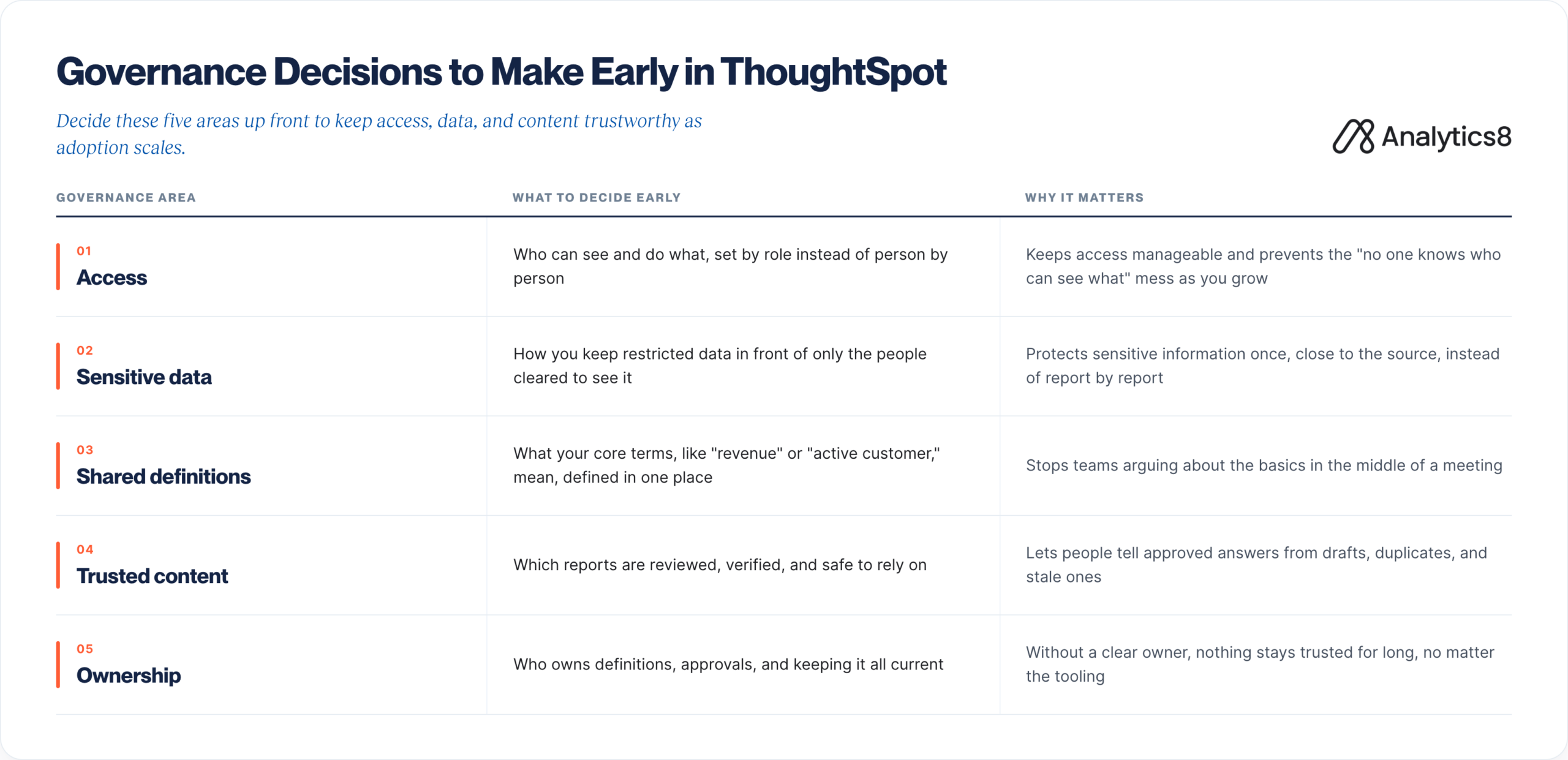
5 Governance Decisions to Make Early in ThoughtSpot
1. Define access controls
Decide who can see and do what, set by role instead of person by person. This keeps access manageable and prevents the “no one knows who can see what” situation as you grow.
A few practical rules help:
- Decide the broad access tiers up front, for example admins, content builders, and viewers, instead of inventing access one person at a time.
- Decide how sensitive data stays protected before you roll out widely, so people only ever see what they are cleared to see.
- Reuse the access rules you already trust from upstream systems instead of rebuilding a separate set.
- Avoid one-off permissions that make it hard to trace who can see what.
2. Protect sensitive data
Decide how restricted data will stay visible only to the people cleared to see it. This protects sensitive information close to the source instead of managing it report by report.
A few practical rules help:
- Apply sensitive data controls as close to the source as possible, then carry those rules through the warehouse and into ThoughtSpot.
- Use role-based access so users only see the data they are approved to view.
- Avoid managing sensitive data one Liveboard or Answer at a time.
- Review sensitive fields before making Models broadly available.
- Confirm that row-level and column-level security rules are working before expanding access.
3. Align shared definitions
Decide what core terms, like “revenue” or “active customer,” mean and define them in one place. This stops teams from arguing about basic definitions in the middle of meetings.
A few practical rules help:
- Define core metrics in the governed source of truth before exposing them in ThoughtSpot.
- Make use-case-specific variations clear, for example gross revenue vs. net revenue or active customer by sales vs. support.
- Use business-friendly names and descriptions so users understand which definition they are searching.
- Make sure shared definitions are reflected consistently across ThoughtSpot Models, Answers, and Liveboards.
- Review high-value definitions with business stakeholders before scaling them to broader audiences since RLS and CLS rules are set at the table level and inherited into Models, not configured on Models directly.
- Add in Synonyms for every column that is search-able in from your Model. For example, a column that reads as “Customer City” should have a Synonym of ‘City’ for business users to quickly infer and move forward with their analysis once a Model, Liveboard, or Spotter go live.
4. Establish trusted content controls
Decide which reports are reviewed, verified, and safe to rely on. This helps people tell approved answers from drafts, duplicates, and stale content.
A few practical rules help:
- Do not make every Liveboard or Answer broadly discoverable by default.
- Create a formal promotion path from draft to trusted asset.
- Require every production Liveboard or Answer to have an owner, validation step, and review cadence.
- Use verification, tagging, or naming standards to help users identify approved content.
- Retire stale, duplicate, or one-off assets before they clutter the environment.
5. Define ownership
Decide who owns definitions, approvals, and keeping content current. Without a clear owner, nothing stays trusted for long, no matter how good the tool is.
A few practical rules help:
- Assign ownership by responsibility, not by general team.
- Name who owns metric definitions, who approves production content, and who maintains Models.
- Decide who monitors stale content and who resolves issues when users challenge a number.
- Move production content through review and version control instead of editing it live in isolation.
- Treat these responsibilities as part of the operating model so governance continues after launch.
The best governance models do not make self-service harder. They make it safer to scale by giving business users a clearer path to trusted answers and giving data teams the controls they need to manage growth.
Best Practices for Scaling AI-Powered Analytics with Spotter
ThoughtSpot has long made analytics more accessible through Search and Liveboards. Spotter, ThoughtSpot’s AI-powered analytics agent, extends that experience by helping users investigate data through natural language conversations. Instead of simply returning a dashboard or answering a single question, Spotter can explain changes, compare results, answer follow-up questions, and guide users through an analysis.
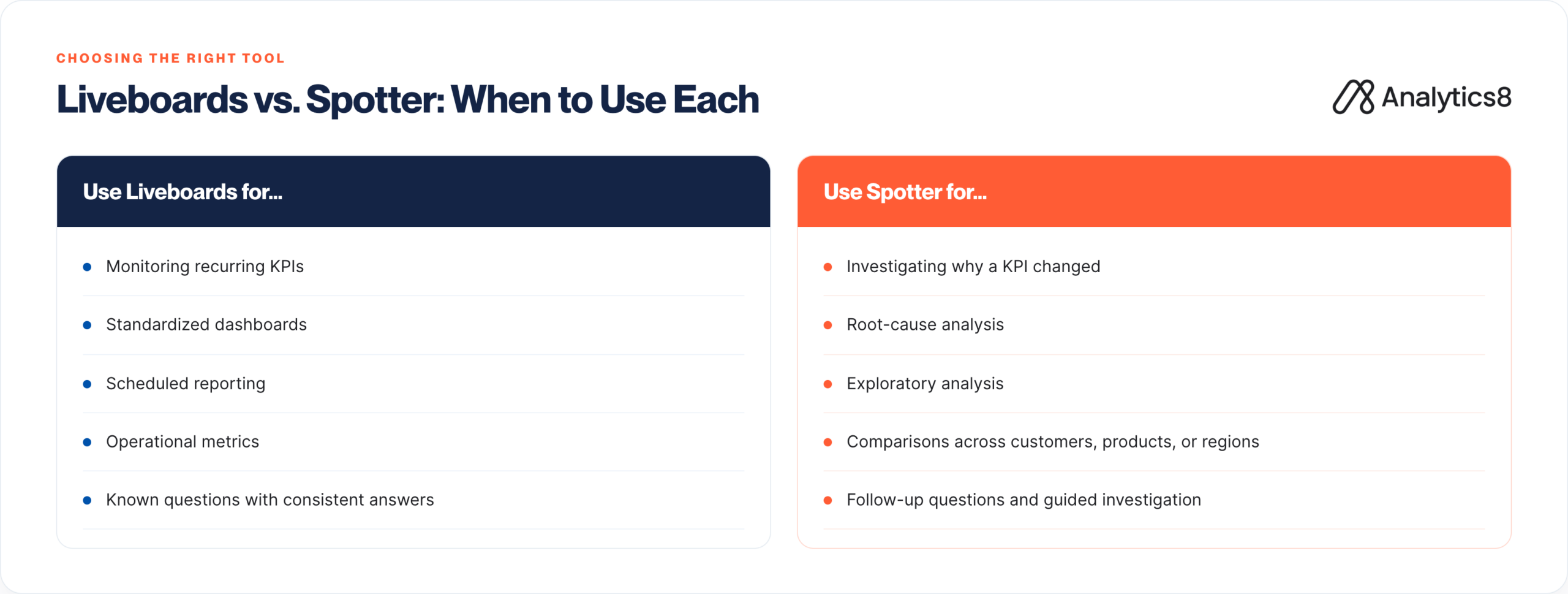
That doesn’t mean every analytics task should move to AI. Liveboards remain the best way to monitor recurring KPIs, standardized reports, and operational metrics. Spotter is most valuable when users need to explore the data, understand why something happened, compare results across dimensions, or investigate questions that don’t have a predefined path. The most successful implementations treat Liveboards and Spotter as complementary experiences, using each where it delivers the most value.
Prioritize questions where AI can reduce analyst dependency
Start by identifying analyses that business users can describe in natural language but would normally rely on an analyst to perform. Spotter is most effective for exploratory questions that require explanation, comparison, and follow-up rather than predefined reporting.
For example, “Show me revenue last quarter” is typically better handled through a Liveboard or Search. “Why did revenue drop last quarter?” is a better fit for Spotter because it requires exploration, comparison, and follow-up.
Spotter is also useful for users who are unfamiliar with a dataset. Instead of needing to know the exact terms or fields to search, they can ask questions in natural language and use Spotter to begin exploring governed data.
Make sure Spotter has the right business context
Spotter can only reason over the data, definitions, and context it is given. Before expanding access, make sure business-friendly names, clear metric definitions, and consistent metadata are already in place – and that data available to Spotter is limited to what the use case needs.
This is especially important for common terms like revenue, customer, product, region, or pipeline. If those definitions are inconsistent, Spotter returns answers that are technically correct but inconsistent with how the business measures performance.
AI-powered analytics needs governed business context before it can scale. Spotter makes analysis easier, but it cannot compensate for unclear definitions or poorly modeled data. It does not fix a weak foundation, it exposes it.
Build a question library from real user language
Do not start with questions analysts think users should ask. Start with the questions business users already ask in meetings and recurring business reviews and then group those questions by use case or persona.
Capture how users naturally phrase questions, what a useful answer should include, which follow-up questions typically come next, and where terminology causes confusion. This gives Spotter better context, gives users a clearer starting point, and helps identify gaps in the semantic model before they return failed or confusing answers.
Teach users when — and how — to use Spotter
Successful adoption depends on more than configuration. Users need to understand when Spotter is the right tool and when a Liveboard, Search, or a general-purpose AI tool is a better fit.
Train users to review answers, validate useful responses, and flag where more context is needed. Spotter is designed for human-in-the-loop validation, not blind trust.
Use feedback to continuously improve the experience
Scaling Spotter does not end at launch. The goal is to keep improving the experience as real users interact with it, not assume the first version will be the final one.
Review the questions users ask, where conversations break down, which answers are being validated, and where users need more guidance. Those patterns reveal opportunities to improve definitions, metadata, training, or the question library.
Organizations that get the most value from Spotter treat it as a governed analytics capability that evolves alongside the business and needs tuning over time.
These activities may seem small, but Spotter and other AI agents need constant feedback to improve. Train business users to validate useful answers, flag unclear responses, and make that feedback part of their normal workflow as they use ThoughtSpot.
Best Practices for Optimizing ThoughtSpot for Adoption and Performance
Users will adopt your ThoughtSpot implementation for one reason: it is faster and more reliable than other methods. If it does not answer their business questions quickly, they will revert to back to spreadsheets, static reports, or analyst requests. Maximizing return on your ThoughtSpot investment means treating usability, content quality, and performance as part of the same operating model.
Treat adoption as an ongoing program, not a milestone
A go-live event is the beginning of adoption, not the end. The organizations that get the most value from ThoughtSpot continually expand the platform based on business needs, introduce new use cases, and help users discover new ways to answer questions.
That means new content tied to real questions, regular check-ins on what is working, and clear ownership for helping users understand what the platform can do as their needs evolve. Environments stagnate when teams move on immediately after launch.
Let usage data guide improvements
User behavior tells you exactly where the platform needs attention.
Review questions such as:
- Where do users start something and then give up?
- Which Liveboards get opened, and which sit untouched?
- Which searches fail repeatedly?
Curate analytics assets as the environment grows
As more people build their own Answers and Liveboards, clutter can grow quickly, and it can become difficult to know which content to trust. Establish a regular review process to certify what Answers, Liveboards, and other reusable analytics exists, promote the assets you trust, and retire the stale ones. is what keeps the environment usable as it grows. That loop between adoption, content quality, and platform health is what keeps the environment usable as it grows.
Make performance part of the user experience, not just infrastructure
Speed is easy to file under “technical problem”, but to the person waiting on a slow search, it is a trust problem. A Liveboard that takes too long to load tells users the tool is unreliable, and that impression sticks. Treat performance as part of the experience, not a back-office task. That may include simplifying overbuilt models, finding and fixing the most expensive queries, indexing or restructuring backend data where needed, and narrowing warehouse connections to the use cases ThoughtSpot needs to support.
Design data models for performance, cost, and usability
Keep Models focused on the use case, use human-readable column names, add synonyms where they help users search, and include only the columns needed for that audience. Clear descriptions also matter because they help users understand what they are searching and help ThoughtSpot interpret the data more reliably.
Model structure matters too. Favor semantic structures that tie common calculations directly to clear fields and measures. Instead of forcing users, ThoughtSpot, or Spotter to infer meaning from loosely defined dimensions, give users a clean, well-labeled path to the questions they need to answer. ThoughtSpot recommends to keep Models lean, with less than 50 columns, ideally.
Finally, turn on indexing for relevant columns, and keep each Model limited to the fields that matter for analytics. Where possible, structure semantic models so Spotter can retrieve the right data context directly, with calculations tied to clear fields and measures instead of buried inside ambiguous dimensions. This reduces guesswork and helps Spotter return more consistent, trustworthy answers.
Common mistakes to avoid
No clear ownership
Define who is responsible for creating, reviewing, certifying, and maintaining Models, Answers, and Liveboards. When responsibilities are vague, content grows without structure, permissions become harder to manage, and teams build technical debt into the environment.
Business logic scattered across multiple tools
Keep definitions for columns, tables, and measures in a single authoritative source, then expose those definitions in ThoughtSpot. When calculations are recreated across multiple tools, users inevitably encounter conflicting answers and lose confidence in the data.
Uncontrolled content growth
Don’t promote every Liveboard to production. Establish a review process for certifying business-ready content, retiring outdated assets, and monitoring warehouse usage. As the number of Liveboards grows, governance becomes just as important as creation.
The goal is simple: the answer should arrive fast enough that no one is tempted to reach for the spreadsheet again.
Talk With a Data Analytics Expert
Key Takeaways
- ThoughtSpot delivers the greatest ROI when it is built around high-value business questions, trusted data, strong governance, and an ongoing adoption strategy—not treated as a standalone technology deployment.
- Successful implementations begin with two or three focused use cases, allowing teams to validate definitions, develop reusable content, build user confidence, and reduce rollout risk before expanding.
- Semantic Models should reflect familiar business language while keeping core metrics and business logic in the governed data warehouse or semantic layer to maintain a consistent source of truth.
- Self-service analytics requires early decisions about role-based access, sensitive data protection, shared definitions, trusted-content controls, and clear ownership of Models, Answers, and Liveboards.
- Liveboards are best suited to recurring KPIs and standardized reporting, while Spotter adds the most value for exploratory questions, explanations, comparisons, and follow-up analysis.
- Spotter cannot compensate for unclear definitions or poorly modeled data; scaling AI-powered analytics requires governed business context, focused datasets, real-world question libraries, user training, and human validation.
- Adoption and performance must be managed continuously through usage monitoring, content curation, user feedback, lean and well-labeled Models, query optimization, and the retirement of stale or duplicate assets.